

Sales automation: The complete guide for efficient sales processes
Sales automation: The complete guide for efficient sales processes Digitalization has fundamentally changed sales. Whereas your sales staff used to manually process every order, today intelligent systems take on repetitive tasks. Sales automation has become a necessity to stay competitive and make your sales processes scalable. In this article, you will learn how sales automation works, what specific use cases there are and how to successfully implement the implementation in your company.
What is sales automation?
Sales automation Means the use of technology to automate recurring sales tasks and optimize sales processes. Software-supported systems perform manual tasks such as data entry, document processing or customer communication. This includes rule-based systems as well as AI-based tools that can make complex decisions.
Relevance today
Sales automation has a noticeable effect on daily work in sales. Studies Show that companies save an average of around 5 hours per week through automated processes, as recurring tasks no longer have to be completed manually. At the same time, the error rate is reduced by up to 20 percent because human input errors are avoided by automatic systems. This leads to greater efficiency, higher data quality and a better customer experience.
Difference from CRM or marketing automation
While CRM systems are primarily used for customer administration and contact management, sales automation focuses on the operational management of sales processes. It automates the entire sales process from quotation to Order processing. Complex business rules and approval workflows are also taken into account.
Benefits of Sales Automation for Your Business
Implementing sales automation brings measurable benefits to your business:
Saving time and increasing efficiency: Your sales representatives can focus on value-adding activities such as customer advice and business development, while routine tasks are automated.
Reduced error rates: Automated systems work more precisely than manual processes. Typing errors when entering data or forgotten tasks are a thing of the past.
scalability: As business volume grows, the level of automation increases proportionally. You can process more orders without building up staff on a linear basis.
Improved customer experience: Faster response times and consistent communication lead to higher customer satisfaction.
Data quality and transparency: Automated systems collect and structure data consistently, which enables better analyses and forecasting.

Order and sales automation: practical use cases
The practical use cases for sales automation are diverse and range from simple workflow optimizations to complex AI-supported processes.
Automate lead management and lead generation
Modern lead management goes far beyond simply collecting contact data. Intelligent systems automatically evaluate incoming leads based on predefined criteria and forward them to the appropriate sales representatives.
A typical workflow starts with automatically capturing leads from various sources, such as website forms, emails, or social media. The system then analyses the available information and evaluates the leads based on predefined criteria such as industry, company size or interaction behavior. This automation of lead generation significantly increases the efficiency of your sales team.
Email marketing and customer communication automation
Customer communication can be automated at various stages of the customer journey. Welcome routes for new customers, reactivation of inactive customers or service reminders can be triggered fully automatically.
Email automation plays a central role in this. Instead of your employees having to contact each potential customer individually, automated systems send personalized emails based on customer behavior and defined triggers. Email templates for various occasions can be prepared while the system automatically selects and sends out the appropriate template. Follow-up emails after offers or appointment reminders are sent on a time-controlled basis without your sales representatives having to think about it.
CRM system integration and workflow automation
Linking different systems is a key factor for successful sales automation. CRM systems, ERP software, and email tools must work together seamlessly to create a consistent sales pipeline.
Modern integration platforms such as Zapier, Make or n8n make it possible to create complex workflows between different applications. An even more direct approach is specialized solutions that act as an intelligent component in these chains. Workist For example, not only automates data entry from orders, but also pushes through the direct integration also includes follow-up processes in ERP and CRM systems. After reading out an order, an order can be automatically created in the ERP system and the deal status in the CRM system can be set to “Won” at the same time.
Document processing and data extraction
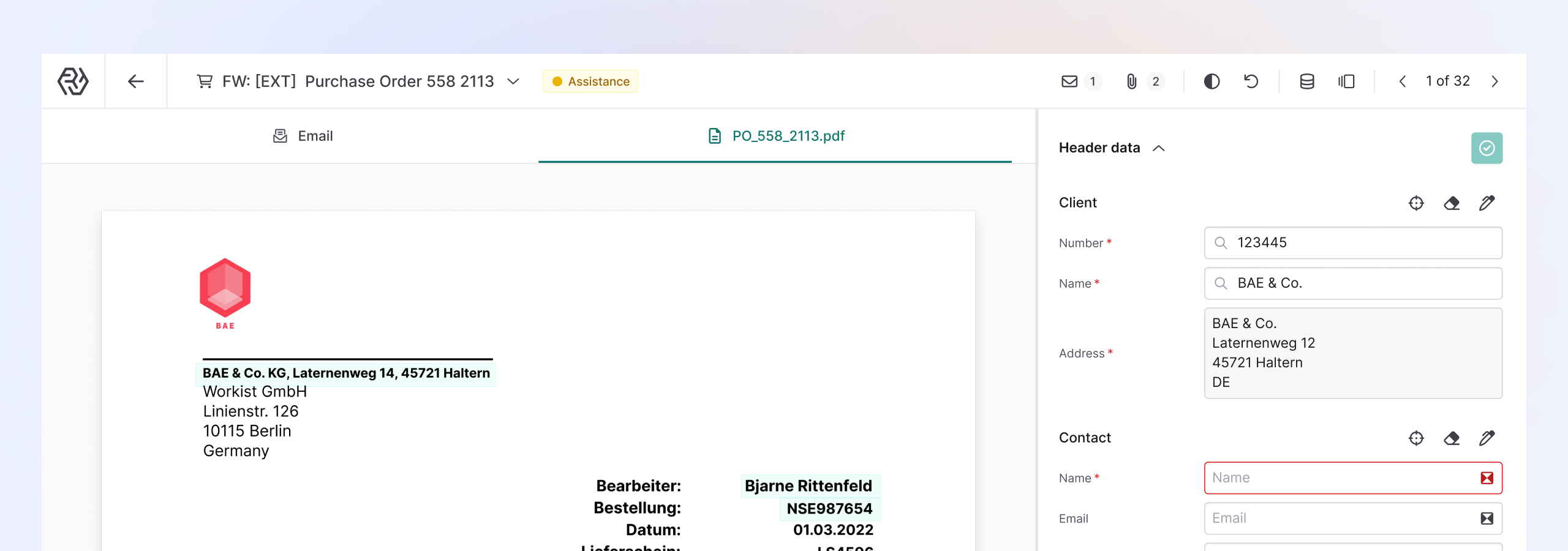
A particularly effective use case is Automate document processing. Solutions such as Workist can significantly reduce the workload here. The AI-based software automatically reads incoming orders, order confirmations and other business documents and transfers the data to your ERP system without errors.
Instead of your employees having to manually process every document, the intelligent software does the data extraction and validation.
Sales automation tools: technologies and software
Modern sales automation is based on various technologies that work together to digitize complex business processes.
OCR, NLP, and RPA
Optical Character Recognition (OCR) makes it possible to automatically enter texts from documents. modernism OCR systems can also process handwritten notes or poorly readable scans.
Natural language processing (NLP) analyses and understands natural language. This technology makes it possible to extract and structure relevant information from emails or documents.
Robotic Process Automation (RPA) automates repetitive tasks by simulating human interactions with software applications. RPA bots can transfer data between different systems or make rule-based decisions.
AI vs. rule-based systems
Rule-based systems work according to predefined if-then logics. They are well suited for standardized processes with clear decision-making rules. AI systems, on the other hand, can learn from data and make meaningful decisions even with incomplete or unstructured information.
The choice between AI and rule-based approaches depends on the complexity of your processes. Rule-based systems are often sufficient for simple routine tasks, while complex decision-making processes benefit from AI support.
Interfaces and data structures
The successful integration of various systems requires standardized interfaces. REST APIs have established themselves as the standard for communication between different applications. Modern sales automation tools offer preconfigured integrations with common ERP systems such as SAP or Microsoft Dynamics.
When choosing automation tools, pay attention to the availability of interfaces to your existing systems. Data quality and consistency are crucial for automation success.
Implementing digital sales processes successfully: step-by-step guide
The successful implementation of sales automation requires a structured approach. Without a clear strategy and careful planning, many automation projects fail.
Optimize sales processes: Identify quick wins
Start by identifying processes that can be automated quickly and bring immediate noticeable improvements. Typical quick wins for automating sales activities include:
- Automatic sending of order confirmations and emails
- Standardised email templates for recurring inquiries
- Automatic data synchronization between CRM and ERP
- Scheduling tools for customer appointments
These measures quickly show success and create acceptance within the team for further automation steps. Your sales representatives immediately save time on routine tasks and can concentrate on value-adding activities.
Documenting and prioritizing processes
Create a detailed overview of all sales processes in your company. Document every step from initial customer contact to final invoicing. When doing so, take into account:
- Time spent on each process step
- Frequency of implementation
- Susceptibility to errors
- Complexity of the task
- availability of suitable tools
Prioritize processes based on automation potential and business impact. High-volume and low-complexity processes are particularly suitable for getting started.
Define and test a pilot project
Choose a clearly defined area for your first automation project. A typical pilot project could automate the submission of offers or the Digitalization of order entry be.
Define measurable goals for the pilot project:
- Reduce processing time by X percent
- Reducing the error rate by Y percent
- Increasing customer satisfaction
First, test automation on a limited scale and collect feedback from the employees involved. Iterate based on the insights and optimize processes.
Avoid common mistakes
Typical challenges when introducing sales automation:
Neglect change management: Employees must be involved in the change process at an early stage. Communicate transparently about the goals and benefits of automation.
Underestimate data quality: Automated systems are only as good as the data they work with. Invest in cleaning and standardizing your data sets.
Underestimate IT resources: Plan sufficient time and budget for technical implementation. Also consider ongoing maintenance and updates.
Choose initial scenarios that are too complex: Start with simple automations and gradually increase complexity.
AI in sales: Intelligent agents for sales automation
Artificial intelligence is revolutionizing sales automation by introducing intelligent agents who can handle complex tasks independently. These AI agents go far beyond simple rule automation and can make contextual decisions.
AI agents in sales For example, they can intelligently categorize emails, prioritize customer inquiries, or even conduct simple sales calls. They continuously learn from interactions and improve their performance over time. This technology allows your salespeople to focus on strategic tasks while AI takes over operational processes.
conclusion
Digitalizing your sales processes is a continuous process that requires strategic planning and operational excellence. Successful companies start with a clear vision and gradually work their way to more complex automation scenarios. Companies that invest in sales automation today gain a sustainable competitive advantage.
Workist specifically supports companies with one of the central levers of sales automation: the automated processing of incoming business documents. The Workist AI agent performs tasks such as entering orders, reading out complex service specifications or processing inquiries. In doing so, he works independently, precisely and fully integrates into existing ERP systems such as SAP or Microsoft Dynamics.
The collected data is intelligently compared with your master data. The system recognizes discrepancies early on and only involves the sales team when it is really necessary. In this way, typical input errors can be reduced by up to 80 percent, while reducing processing time by up to 90 percent. The software learns with every document, is continuously becoming more efficient and relieves your teams in the long term.
Book a free and non-binding potential analysis and see how your team is noticeably relieved.
Sales automation FAQs
Which sales tasks can already be reliably automated today?
Document processing, data entry, email communication, offer preparation, order confirmations and reporting can already be reliably automated today. AI-powered tools can also extract unstructured data from documents.
For which roles in the company is sales automation particularly relevant?
Particularly relevant for office staff, clerks and contract makers. Sales managers also benefit from automated reporting. In manufacturing and wholesaling, the benefits are particularly great due to high volumes of documents.
How secure is data processing in automated sales processes?
Modern solutions meet the highest security standards with certifications such as SOC-2. Servers in Germany are also subject to the GDPR. Automation even significantly reduces the risk of human error.
How long does it take to implement sales automation?
Simple automations can be implemented within a few weeks, complex system integrations take several months. A structured approach with pilot projects quickly shows initial results and shortens the overall duration.
What are the costs of introducing sales automation?
Cloud solutions work with monthly license fees; individual developments require higher initial investments. Consider training and integration. The ROI is usually visible after a few months.


